External chat with a shareable link
An external channel (Connect) lets you chat with a party outside the housing company — for example a builder, contractor or consultant. The external person joins via a shareable link without a VAREK account, and sees only this one channel.
Create an external channel
Section titled “Create an external channel”- Open Communication and select the + Channel button at the top of the channel list (its tooltip is “Create channel”).
- Give the channel a name.
- Choose External channel (Connect) as the channel type.
- Select Create channel.
Share the link with an external person
Section titled “Share the link with an external person”- Open the channel and its settings (⚙).
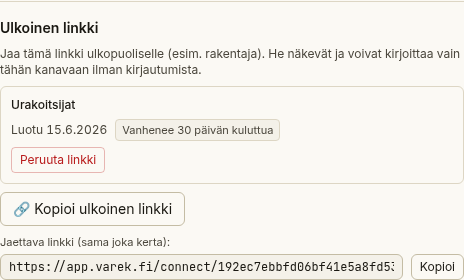
- Scroll to External link.
- Select + Create and copy external link. VAREK creates the link and copies it to the clipboard. (Once a link already exists, the button reads 🔗 Copy external link.)
- The link also appears in a field, from which you can copy it again with the Copy button.
- Send the link to the external person however you like (e.g. by email).
The external person opens the link in a browser, types their name, and can read and send messages in this channel only.
Revoke the link
Section titled “Revoke the link”When the conversation is no longer needed, you can cut off access.
- Open the channel settings.
- Find the active link under External link.
- Select Revoke link and confirm.
A revoked link no longer grants access to the channel.