Maintenance Plan — AI Draft
The AI draft feature on the /kpts page helps the board draft the five-year maintenance need assessment (AOYL 6:3). The AI grounds its proposals in the housing company’s own defect report, inspection, and precedent history — not generic building knowledge.
How the AI draft works
Section titled “How the AI draft works”When a board admin clicks ✨ Pre-fill with AI on the KPTS page:
- VAREK reads the housing company’s open defect reports (full detail: severity, category, repair responsibility), failed inspection findings, and KRIL/FISE precedents linked to those defects.
- The AI proposes measures for the next 5 years — only from the 15 canonical KPTS components accepted by HTJ.
- Each proposal shows where it came from: defect chip (name + severity), finding chip (room · item), and precedent chip (KRIL/FISE reference).
The AI never proposes cost estimates — the board fills those in.
Reviewing proposals
Section titled “Reviewing proposals”In the review dialog each row shows:
- Checkbox — uncheck rows you don’t want to add. Rows whose component+title matches an existing plan item are unchecked by default (“already in plan” badge).
- HTJ action description (
description) — editable text field in Finnish. This text flows directly into the HTJ export to the Land Survey of Finland. - Planned year — adjustable.
- Rationale — short explanation of why the measure is timely.
- Evidence chips — the company’s own references the proposal is based on.
Click Add selected — accepted rows are added to the maintenance plan and appear immediately in the HTJ export worksheet.
Precedents
Section titled “Precedents”If no precedents are found (chips are absent), VAREK shows a notice: refresh precedents in defect reports so new KRIL/FISE links enrich the next draft’s rationale.
The precedents feature requires the Precedents plan feature to be enabled for the housing company.
From inspections into the plan
Section titled “From inspections into the plan”Alongside the AI draft, you can add inspection findings to the maintenance plan structurally, without AI.
Condition-survey inspection
Section titled “Condition-survey inspection”When you start a new inspection (/inspections/new) and choose Common area as the target, you get a Condition survey (for the maintenance plan) toggle. When it is ticked, the inspection’s findings are proposed for the maintenance plan instead of a defect report: every failed (✗) finding shows an Add to the maintenance plan button (visible to admins only).
The “From inspections” list on the KPTS page
Section titled “The “From inspections” list on the KPTS page”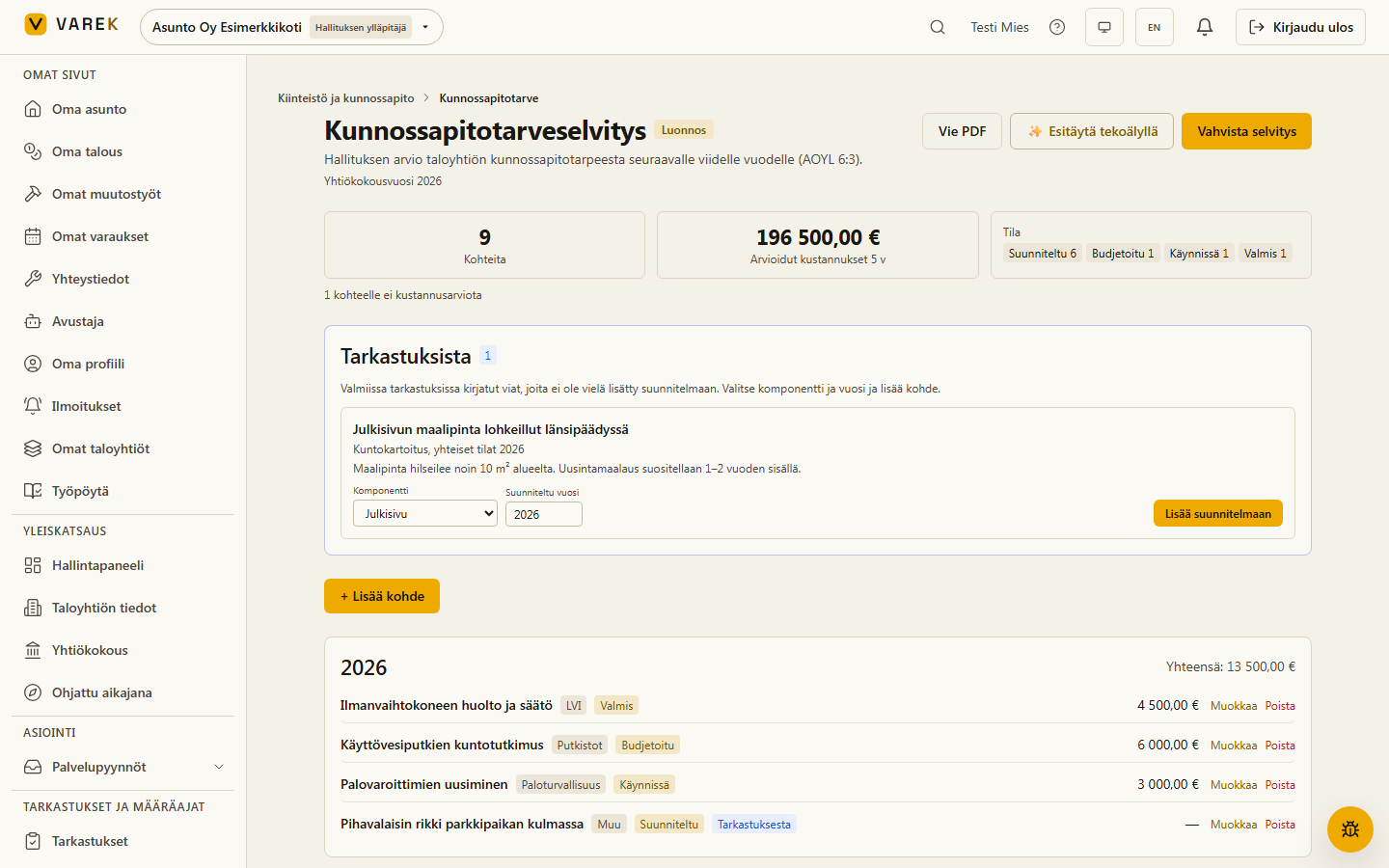
The top of the KPTS page shows a From inspections list whenever completed inspections have defect findings that have not yet been added to the plan. Each row has:
- the finding headline with a link to the source inspection,
- a Component picker (pre-filled from the finding) and a Planned year,
- an Add to plan button.
Adding creates a new plan item with no cost estimate (the board fills that in) and removes the finding from the list. The same finding never duplicates — if it is already added, the button does nothing further.
The “From inspection” badge
Section titled “The “From inspection” badge”A plan row that originated from an inspection shows a small From inspection badge that links back to the source inspection, so you can always see which finding a measure is based on.
Only an admin (board_admin) can add findings to the plan, and adding is not possible on a finalized assessment.
Proposals are for the board’s consideration — VAREK does not replace a professional condition assessment and never proposes cost estimates.