Your finances — overview
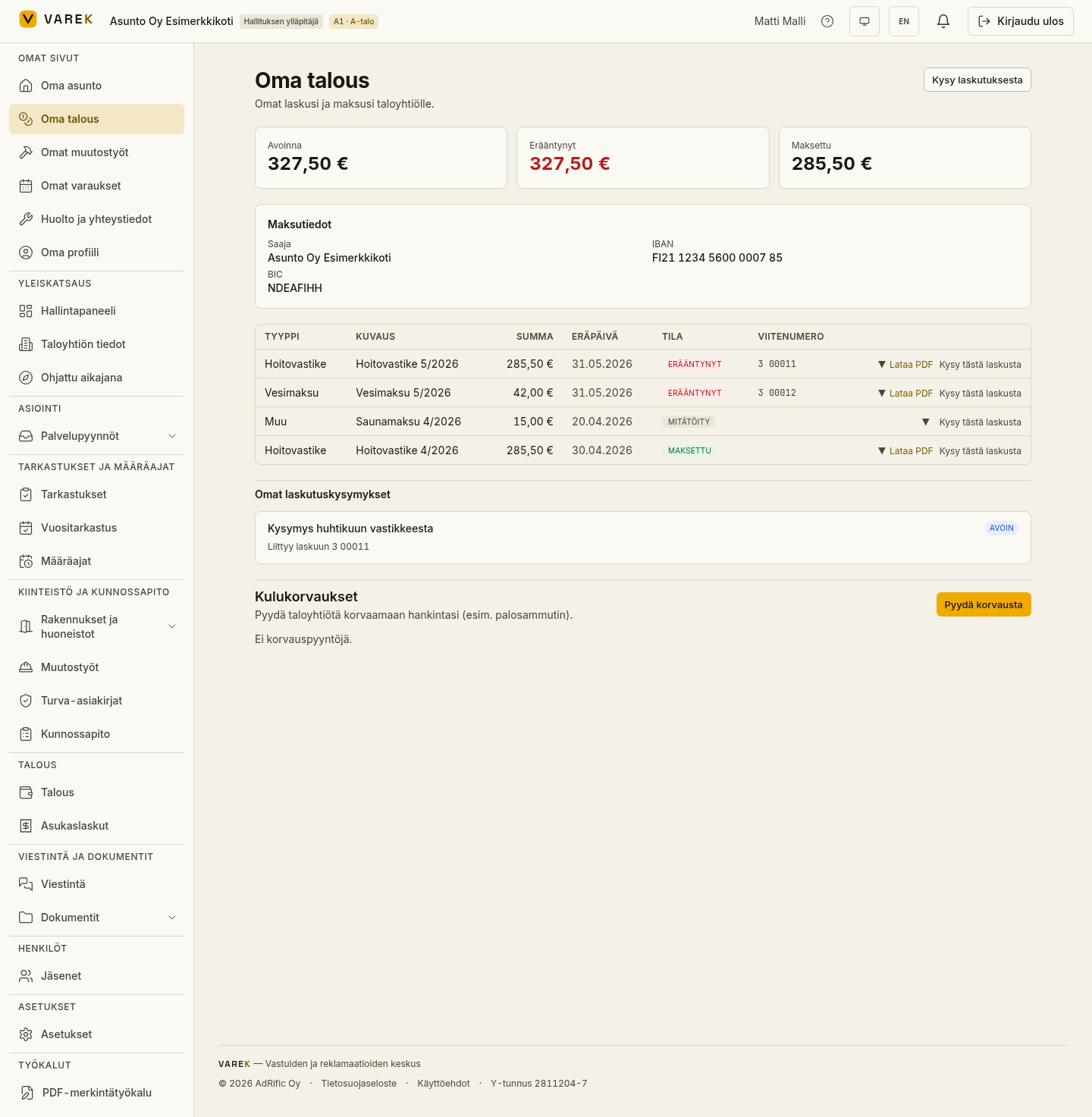
Your finances (“Oma talous”) is the shareholder’s personal finance view. It shows all your invoices to the housing company — both paid and outstanding — along with the company’s payment details for unpaid invoices. You can also download invoices as PDFs and raise a billing question with the accountant.
Open the page from the Omat sivut (My pages) group in the left-hand menu, under Oma talous (Your finances).
What’s on the page
Section titled “What’s on the page”Key figures
Section titled “Key figures”A row of key figures at the top of the page shows your situation at a glance:
- Avoinna (Open) — the total of your unpaid invoices.
- Erääntynyt (Overdue) — the total of open invoices whose due date has already passed. Highlighted if you have any overdue invoices.
- Maksettu (Paid) — the total of your paid invoices.
- Hyvitykset (Credits) — shown only if credit notes have been issued to you (for example, a water reconciliation surplus).
Payment details
Section titled “Payment details”If you have open invoices, the page shows the company’s payment details: payee, IBAN account number and, where applicable, BIC. You’ll need these if you pay an invoice yourself in your online bank.
Invoice list
Section titled “Invoice list”In the invoice table, each row shows the invoice type (for example, maintenance charge, capital charge, water fee), description, amount, due date, status and the reference number of an open invoice. At the end of the row you can open the invoice’s payment history, open or download the invoice PDF, and raise a question about the invoice.
Invoice statuses
Section titled “Invoice statuses”Each invoice has a status that reflects its payment situation:
- Avoinna (Open) — the invoice is awaiting payment and the due date has not yet passed.
- Erääntynyt (Overdue) — the due date has passed and the invoice is unpaid.
- Osittain maksettu (Partially paid) — part of the invoice has been paid; the row shows the remaining open amount.
- Hyvitys (Credit) — this is a credit note that the company owes you.
- Maksettu (Paid) — the invoice has been paid in full.
- Mitätöity (Void) — the invoice has been cancelled and does not need to be paid.
Other cards on the page
Section titled “Other cards on the page”Expense reimbursements (Kulukorvaukset)
Section titled “Expense reimbursements (Kulukorvaukset)”If the housing company uses the expense reimbursement feature, the page shows a Kulukorvaukset (Expense reimbursements) card. You can submit a reimbursement request (for example, for volunteer work or a small purchase) and attach a receipt as a PDF or image file. The status updates as the board processes it:
- Odottaa (Pending) — the request has been sent and is not yet reviewed.
- Hyväksytty (Approved) — the board has approved the reimbursement; any decision note is shown on the request.
- Hylätty (Rejected) — the board has rejected the request; the reason appears in the decision note.
- Maksettu (Paid) — the reimbursement has been paid to your account.
Your company-loan shares (Yhtiölainasi)
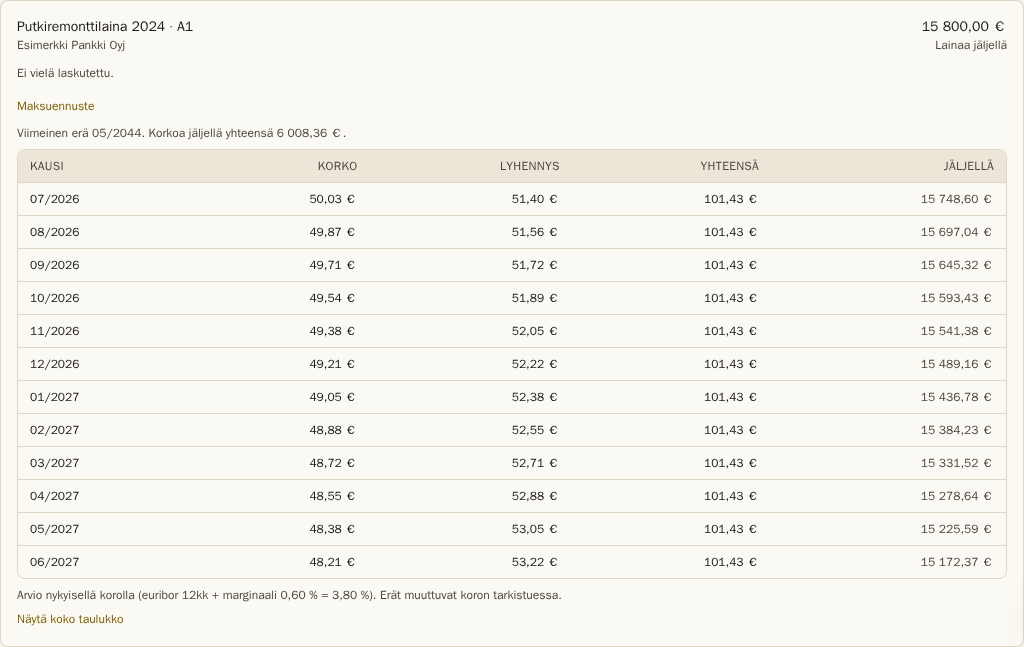
Section titled “Your company-loan shares (Yhtiölainasi)”If the company’s accountant has set up a company loan and assigned a loan share to you, the page shows a Yhtiölainasi (Your company loans) card. The card lists each of your loan shares: the loan name, lender, remaining principal and a paid indicator. Expanding a share shows the periodic interest and principal repayment table.
The Maksuennuste (Payment forecast) button shows the upcoming installments: the next 12 months with interest and principal, the estimated final installment — and, if you wish, the full table through the end of the loan. The forecast is calculated at the current interest rate, so the amounts adjust when the bank resets the rate. If no Euribor rate has been recorded in the system yet, the forecast cannot be shown.
Wallet top-up receipts (Latauskuitit)
Section titled “Wallet top-up receipts (Latauskuitit)”If you have topped up your wallet via the Stripe payment service (for facility booking payments), the page shows a Latauskuitit (Top-up receipts) card. It lists completed top-ups: the date, amount loaded, service fee and total. You can download a receipt as a PDF from each row using the Lataa kuitti (Download receipt) button.
What you can do
Section titled “What you can do”- View your own invoices and their breakdown.
- Pay an invoice using the reference number or the bank barcode.
- Ask about billing if an invoice raises any questions.