Apartment ownerships
Ownership tells who an apartment belongs to. An owner can be a person or a company, and a single apartment can have several owners with shares. The same person can be an owner, a resident, or both in an apartment. Ownerships drive, among other things, how resident invoices are addressed.
This page has two perspectives: board management and shareholder requests.
Board: manage the owners of one apartment
Section titled “Board: manage the owners of one apartment”- Open Buildings and apartments and find the apartment.
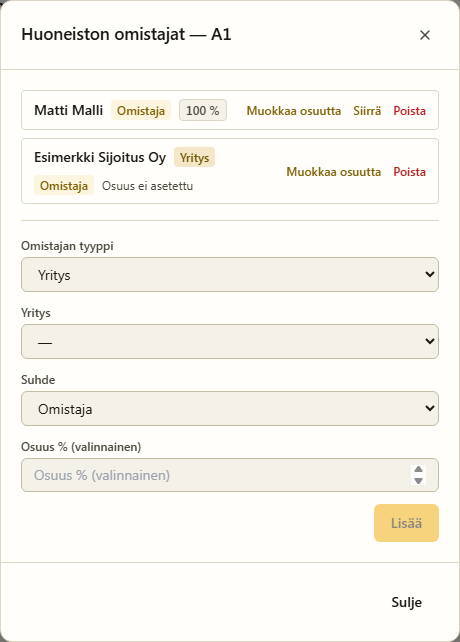
- Choose the Owners (“Omistajat”) button on the row.
- You will see all active owners of the apartment — both people and companies
(a company has a Company badge). You can:
- Edit share — set the ownership share as a percentage.
- Transfer — transfer ownership to another member (people only).
- Remove — end the ownership.
- Add a new owner from the form at the bottom: pick the owner type (Member or Company), then the member or company, the relation (owner or resident) and the share. The company picker lists every company registered in the housing company — a board-added company ownership also approves the company, and if a pending ownership request existed for the same company, it is automatically marked approved.
You can also manage a member’s apartments on the Members page via the Manage button — there you can also see the history of ended ownerships.
The Owner column on the apartment list
Section titled “The Owner column on the apartment list”The Omistaja (Owner) column on the Rakennukset ja huoneistot page prefers the ownership register: owners recorded via the Omistajat action, ordered by share. If an apartment has no recorded ownerships, the column falls back to the apartment’s free-form contact (for example from a CSV import) and shows a small yhteystieto (contact) badge — imported data stays visible without masquerading as the official register. If both exist and differ, the register wins and the form contact is shown as a tooltip.
The apartment form’s name, email and phone fields are contact details, not the ownership register — ownerships are always recorded via the Omistajat action. The list’s Sähköposti (yhteystieto) column always shows this contact email.
Invitations record ownership automatically
Section titled “Invitations record ownership automatically”When you invite a member (Members and roles) and link an apartment to the invitation, you also choose the relation: Omistaja (owner) or Asukas (resident). When the invitee accepts, the chosen relation is recorded in the ownership register automatically — an owner invitation becomes a register entry in the Owner column, a resident invitation only records residency (it does not appear in the Owner column). The same choice is made when approving a join request. A tenant invitation (the Vuokrasuhde feature) always records residency, never ownership.
Shareholder: ownership of your own apartment
Section titled “Shareholder: ownership of your own apartment”A shareholder handles ownership matters on the My apartment page
(/oma-asunto):
- Owners (“Omistajat”) — for each apartment, a list of all owners of the apartment is shown (including yourself).
- Request another apartment — if an apartment is available to be linked, you can send a request to become an owner or resident. The board approves the request.
Shareholder: a company as owner
Section titled “Shareholder: a company as owner”If you own an apartment through a company, register the company in your own details first:
- Open My profile and scroll to My companies (“Omat yritykset”).
- Choose Add and fill in the company’s name, business ID, billing email and address.
- Save. The company shows the pending status until the board approves it.
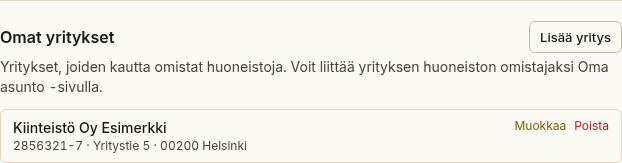
After that you can propose your company as the owner of an apartment on the My apartment page: pick the company and the share for your apartment and submit the proposal.
Board: approve ownership requests
Section titled “Board: approve ownership requests”Requests sent by shareholders wait for approval on the Apartment requests tab of the Members page:
- Open Members → Apartment requests.
- Review the requester, the apartment, the relation and any company.
- Set the ownership share if needed and choose Approve — or Reject and optionally give a reason.
Approving a company request creates a company ownership for the apartment and approves the company at the same time.