Public API and API keys
The VAREK public REST API lets you read defect and claim data directly into your own systems or partner software. It is designed for board admins and technical integrators who want to automate data transfers or build custom reporting dashboards.
:::note Board admin only. API key management is visible only to the housing company’s board admin. Other roles do not see this section in Settings. :::
What is the public API?
Section titled “What is the public API?”The API (Application Programming Interface) lets you fetch data from VAREK programmatically — without logging into the user interface. With API keys you can, for example:
- pull open defect reports into your property management system,
- track claim statuses in an external reporting tool,
- automate data exports or dashboard refreshes.
Creating an API key
Section titled “Creating an API key”- Sign in as a board admin.
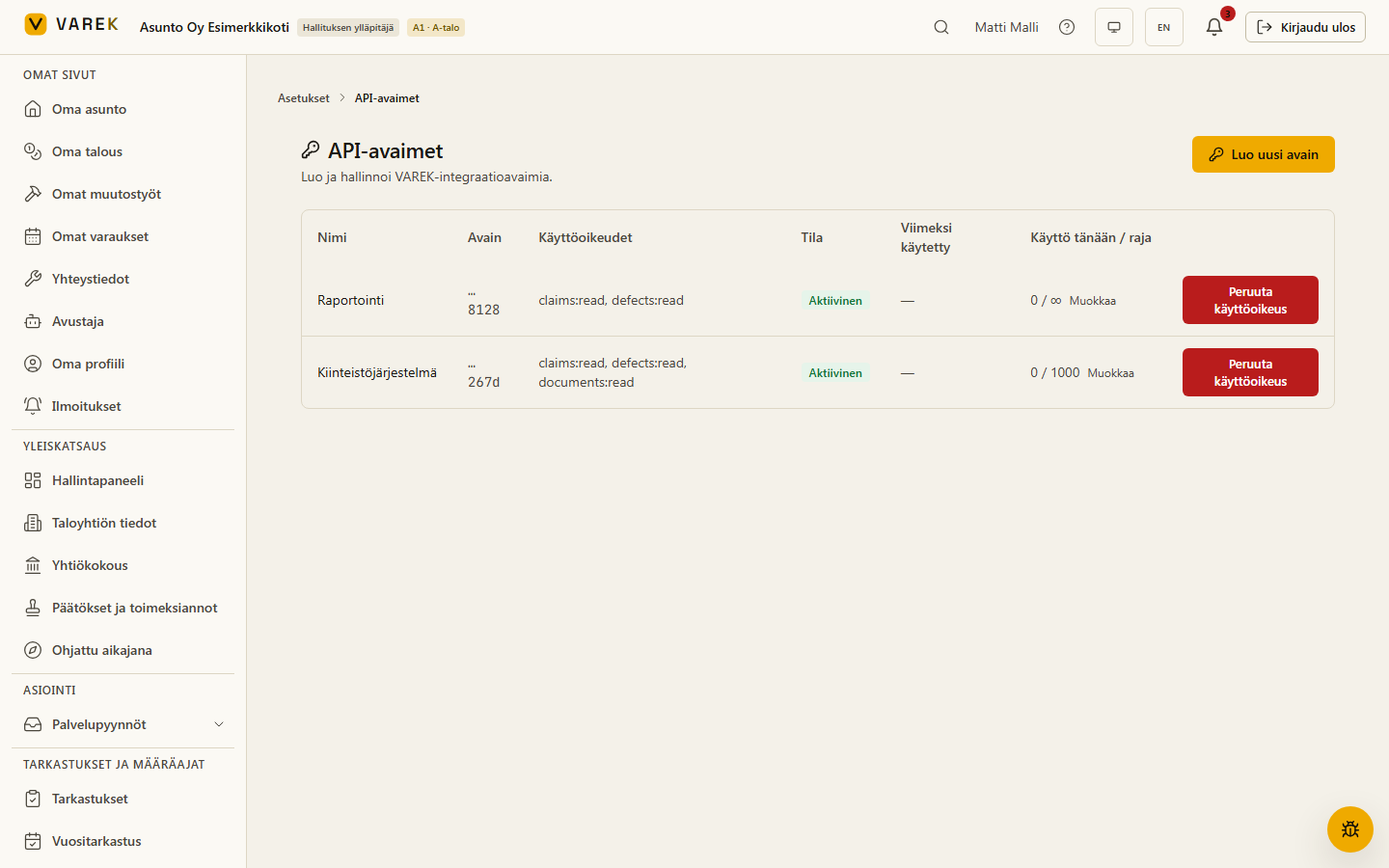
- Go to Asetukset → API-avaimet (Settings → API keys).
- Click Luo uusi avain (Create new key).
- Give the key a descriptive name (e.g. “Property system 2026”).
- Select the scopes (permissions) you need:
defects:read— read access to defect reportsclaims:read— read access to claimsdocuments:read— read and download access to documentsbookings:read— read access to facilities and bookingsinspections:read— read access to inspections and findingsmaintenance:read— read access to maintenance plans (KPTS)announcements:read— read access to announcement channels and announcements
- Confirm.
:::caution The key is shown only once.
Copy it immediately — it starts with vrk_live_…. The key cannot be
retrieved again. If it is lost, create a new one and delete the old key.
:::
Authentication (Bearer token)
Section titled “Authentication (Bearer token)”Every API request requires an Authorization header:
Authorization: Bearer vrk_live_…Attach the key to every HTTP request header. Never share the key or commit it to version control.
:::note The API requires a subscription plan that includes API access.
API keys can only be created while the association’s plan includes the API
module. If the plan changes to a narrower one (e.g. the VAREK Reklamaatio
module plan), existing keys stop working immediately (response 403 feature_not_in_plan) and webhook deliveries pause. Keys are not deleted —
they resume working as soon as the plan includes API access again.
:::
Base URL and versioning
Section titled “Base URL and versioning”https://api.varek.fi/v1All endpoints begin with this path. v1 is the current stable version.
Example request
Section titled “Example request”Fetch the housing company’s defect reports with curl:
curl -s \ -H "Authorization: Bearer vrk_live_YOURKEY" \ "https://api.varek.fi/v1/defects?limit=10"The response is JSON and contains a data array plus pagination metadata.
Available endpoints
Section titled “Available endpoints”| Endpoint | Method | Scope | Description |
|---|---|---|---|
/v1/defects | GET | defects:read | List defect reports (paginated) |
/v1/defects/{id} | GET | defects:read | Fetch a single defect report |
/v1/claims | GET | claims:read | List claims (paginated) |
/v1/claims/{id} | GET | claims:read | Fetch a single claim |
/v1/documents | GET | documents:read | List document metadata (paginated) |
/v1/documents/{id} | GET | documents:read | Fetch a single document’s metadata |
/v1/documents/{id}/download | GET | documents:read | Get a short-lived (120 s) signed download URL |
/v1/facilities | GET | bookings:read | List bookable facilities (saunas, laundry rooms, clubrooms…) |
/v1/facilities/{id} | GET | bookings:read | Fetch a single facility |
/v1/bookings | GET | bookings:read | List facility bookings (paginated, filterable) |
/v1/bookings/{id} | GET | bookings:read | Fetch a single booking |
/v1/inspections | GET | inspections:read | List inspections (paginated, filterable) |
/v1/inspections/{id} | GET | inspections:read | Fetch a single inspection |
/v1/inspections/{id}/findings | GET | inspections:read | List the findings of one inspection |
/v1/maintenance-plans | GET | maintenance:read | List maintenance plans / KPTS (paginated, filterable) |
/v1/maintenance-plans/{id} | GET | maintenance:read | Fetch a single maintenance plan |
/v1/maintenance-plans/{id}/items | GET | maintenance:read | List the repair items of one plan |
/v1/announcement-channels | GET | announcements:read | List announcement channels (paginated) |
/v1/announcement-channels/{id} | GET | announcements:read | Fetch a single announcement channel |
/v1/announcements | GET | announcements:read | List announcements (paginated, filterable) |
/v1/announcements/{id} | GET | announcements:read | Fetch a single announcement |
/v1 | GET | — | API metadata (version, links) |
/v1/openapi.json | GET | — | OpenAPI 3.1 specification |
Document scope notes: the API returns document metadata and a separate
signed download link — never raw storage paths. Board-internal
(hallitus_only) and apartment-scoped (apartment_scoped) documents are
excluded from the API surface entirely. A file still undergoing malware
scanning (or quarantined) returns a file_not_cleared error (403) instead of
a download link.
Booking scope notes: bookings are returned as apartment-linked, never
person-linked — the booker’s identity, guest contact details and booking
management tokens never appear in the API. /v1/bookings supports filters:
?facility_id=<uuid>— only bookings for one facility?from=…&to=…— bookings overlapping the window[from, to)(ISO 8601 timestamps; an omitted bound is open)?status=confirmedor?status=cancelled— without the filter, cancelled bookings are included too (for calendar sync)
An invalid filter value returns a 400 error with code invalid_parameter.
Inspection scope notes: inspections (annual inspections, 10-year
inspections, condition surveys and freeform inspections) are returned
person-free — the inspector’s name or user identity never appears in the
API. Finding photos are surfaced as a count only (photo_count), never as
file paths or download links. A finding’s defect_id shows which defect
report it was promoted to (fetch it via /v1/defects/{id}).
/v1/inspections supports filters:
?state=completedor?state=in_progress— finished or ongoing sessions?scope=apartmentor?scope=common_area— apartment or common-area inspections?from=…&to=…— inspections started within[from, to)(ISO 8601 timestamps; an omitted bound is open)
The findings list can be filtered by status: ?status=ok|fail|na|pending.
An invalid filter value returns a 400 error with code invalid_parameter.
Maintenance plan (KPTS) scope notes: plans are returned person-free —
the author’s or approver’s user identity never appears in the API (the
finalized_at timestamp records when the plan was locked). An association has
at most one active plan at a time; finalized plans are the AGM-frozen
history. Plan items carry the building component, the planned execution year
and the board-level cost estimate (estimated_cost). An item promoted from an
inspection carries source_finding_id, linking back to the
/v1/inspections/{id}/findings row. /v1/maintenance-plans supports filters:
?status=activeor?status=finalized?agm_year=2026— the plan targeting one AGM year
The item list can be filtered with ?status=planned|budgeted|in_progress|done|deferred,
?component=roof|facade|plumbing|… and ?planned_year=2027.
An invalid filter value returns a 400 error with code invalid_parameter.
Announcement scope notes: the API exposes only announcement channels
(tiedotekanavat) — the official channels where only administrators can post.
Resident chats, private and apartment-scoped channels never appear in the API,
and board emails and guest-channel sessions are not part of the API surface at
all. Only a channel’s top-level messages posted while announcement mode has
been enabled are returned — resident thread replies, deleted messages,
system messages and chat history predating announcement mode never appear —
and announcements are person-free: the author’s name or user identity
never appears in the API.
An announcement’s attached_document_ids field links its attachments to
/v1/documents/{id} (requires the documents:read scope; the document’s own
visibility model applies). /v1/announcements supports filters:
?channel_id=<uuid>— only announcements from one channel?pinned=trueor?pinned=false— pinned or unpinned announcements?from=…&to=…— announcements created within[from, to)(ISO 8601 timestamps; an omitted bound is open)
The channel list can be filtered with ?archived=true|false. An invalid
filter value returns a 400 error with code invalid_parameter.
Pagination
Section titled “Pagination”List endpoints accept query parameters:
?limit=N— number of items per response (1–100, default 50)?offset=N— number of items to skip (pagination offset)
Example: GET /v1/defects?limit=50&offset=100
Rate limiting
Section titled “Rate limiting”The per-key limit is approximately 120 requests per minute. When the
limit is exceeded the API returns HTTP 429 Too Many Requests.
Daily call cap (optional)
Section titled “Daily call cap (optional)”Each key can additionally have a daily call cap (Settings → API keys → Edit on the key row). The cap is the maximum number of calls per day for that key; an empty field means no cap.
- The day changes at midnight UTC (UTC day) — 02:00 or 03:00 Finnish time depending on the season.
- Calls over the cap receive a
429response with the error codedaily_call_cap_exceeded. TheRetry-Afterheader tells you, in seconds, when the counter resets. - The Used today / cap column in the key list shows usage for the current UTC day. Rejected over-cap attempts are also counted, so the number can exceed the cap.
Error responses (RFC 9457)
Section titled “Error responses (RFC 9457)”Errors are returned as application/problem+json following RFC 9457:
{ "type": "about:blank", "title": "invalid_api_key", "status": 401, "detail": "Missing or malformed API key."}The machine-readable error code is in title (e.g. invalid_api_key,
insufficient_scope, rate_limited, daily_call_cap_exceeded, not_found);
type is always about:blank. Match on title, not type.
Common HTTP status codes:
| Code | Meaning |
|---|---|
200 | Success |
400 | Bad request (e.g. invalid parameter) |
401 | Authentication missing or key invalid |
403 | Key does not have the required scope |
429 | Rate limit or daily call cap exceeded |
500 | Server error |
Interactive API reference
Section titled “Interactive API reference”Try the API in your browser on the VAREK interactive Scalar reference page:
The raw OpenAPI 3.1 specification is also available:
https://api.varek.fi/v1/openapi.jsonTypeScript client library (SDK)
Section titled “TypeScript client library (SDK)”If you’re building an integration in TypeScript or JavaScript, you can use the
official typed client library @varek/sdk instead of calling the API by hand.
It handles authentication, pagination and error handling for you, and its types
are generated from the same OpenAPI specification, so they stay in sync with the
API.
npm install @varek/sdkimport { createVarekClient } from "@varek/sdk";
const varek = createVarekClient({ apiKey: "vrk_live_..." });
const { data } = await varek.listDefects({ limit: 50 });const claim = await varek.getClaim("…");Optional settings (SDK 0.2.1+):
timeoutMs— per-request timeout in milliseconds. Without it, requests wait until the runtime’s default limit.baseUrl— defaults tohttps://api.varek.fi. The URL must behttps://— the client rejects a plaintext URL unless the development-onlyallowInsecure: trueflag is set (never use it in production).
const varek = createVarekClient({ apiKey: "vrk_live_...", timeoutMs: 15_000,});The library is published on npm: npmjs.com/package/@varek/sdk.