Precedents
Every defect’s page has an Ennakkopäätökset (Precedents) panel that suggests the decisions that best match the defect, drawn from three sources: the Finnish Consumer Disputes Board (KRIL), FISE construction-defect cards, and FINE Insurance Disputes Board recommendations. They help you see how similar cases have been handled when you’re considering a claim or an insurance reimbursement.
Sources
Section titled “Sources”KRIL — Finnish Consumer Disputes Board
Section titled “KRIL — Finnish Consumer Disputes Board”KRIL handles disputes in housing sales and construction between consumers and sellers or builders. Its decisions are public documents that can be cited by case number in claim letters.
FISE — construction-defect cards
Section titled “FISE — construction-defect cards”FISE construction-defect cards describe typical construction defects and their remediation. VAREK shows the card code and a summary, with a link to the full card.
FINE — Insurance Disputes Board
Section titled “FINE — Insurance Disputes Board”FINE (the dispute resolution body operating alongside the Federation of Finnish Financial Services) handles insurance disputes, including property insurance cases. FINE decisions are especially useful when the defect involves water damage, moisture damage, a pipe leak or a roof leak and you are considering an insurance claim or appealing an insurer’s decision.
VAREK presents each FINE decision as its own concise Finnish-language summary of the case and its outcome. The source link goes directly to the decision on fine.fi, where you can read the full text.
What the panel shows
Section titled “What the panel shows”The panel opens on the defect’s page and refreshes automatically. Each suggestion shows:
- KRIL decisions: the case number, the year and the outcome (e.g. accepted, partial, rejected).
- FISE construction-defect cards: the card’s code and title.
- FINE decisions: the case title, the year and a short own-words summary, with a link to the decision on fine.fi.
- Match indicators: same category or subcategory, and similarity as a percentage.
- Summary: a short summary you can expand.
- Source: a link to the original decision or card.
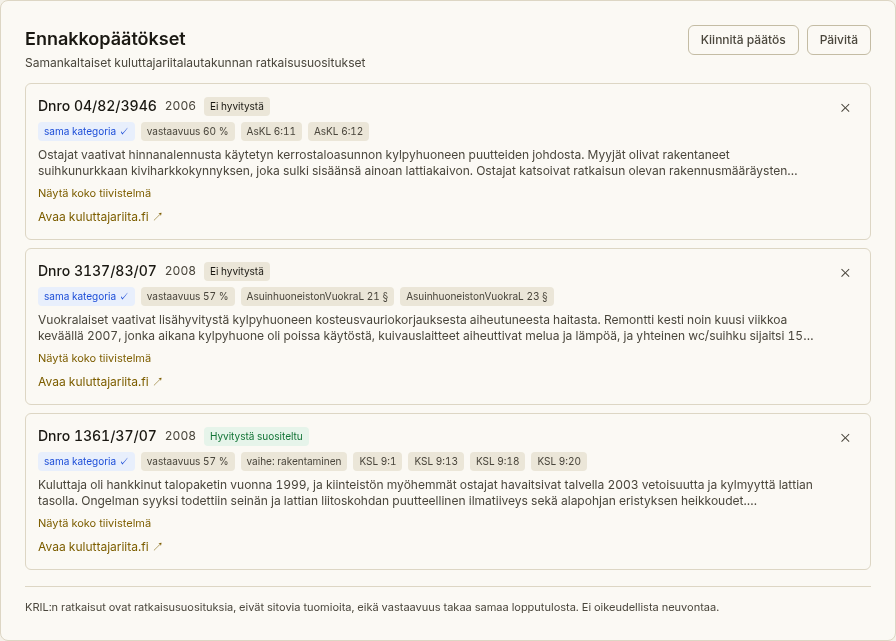
Refresh the suggestions
Section titled “Refresh the suggestions”The panel fetches suggestions automatically when the list is empty or the suggestions are stale. You can re-fetch them at any time with the Päivitä (Refresh) button — for example after editing the defect’s title or description, when fresher matches may be more relevant.
Pin and remove (management)
Section titled “Pin and remove (management)”A member with management rights can:
- Pin a relevant decision to a suggestion, keeping it flagged in the panel.
- Remove a suggestion that doesn’t fit the case.