Emails — targeted messages
On the Emails (Sähköpostit) page, board members, the property manager and the accountant can write and send emails straight from VAREK to chosen recipients. Each recipient gets their own copy — nobody sees anyone else’s address.
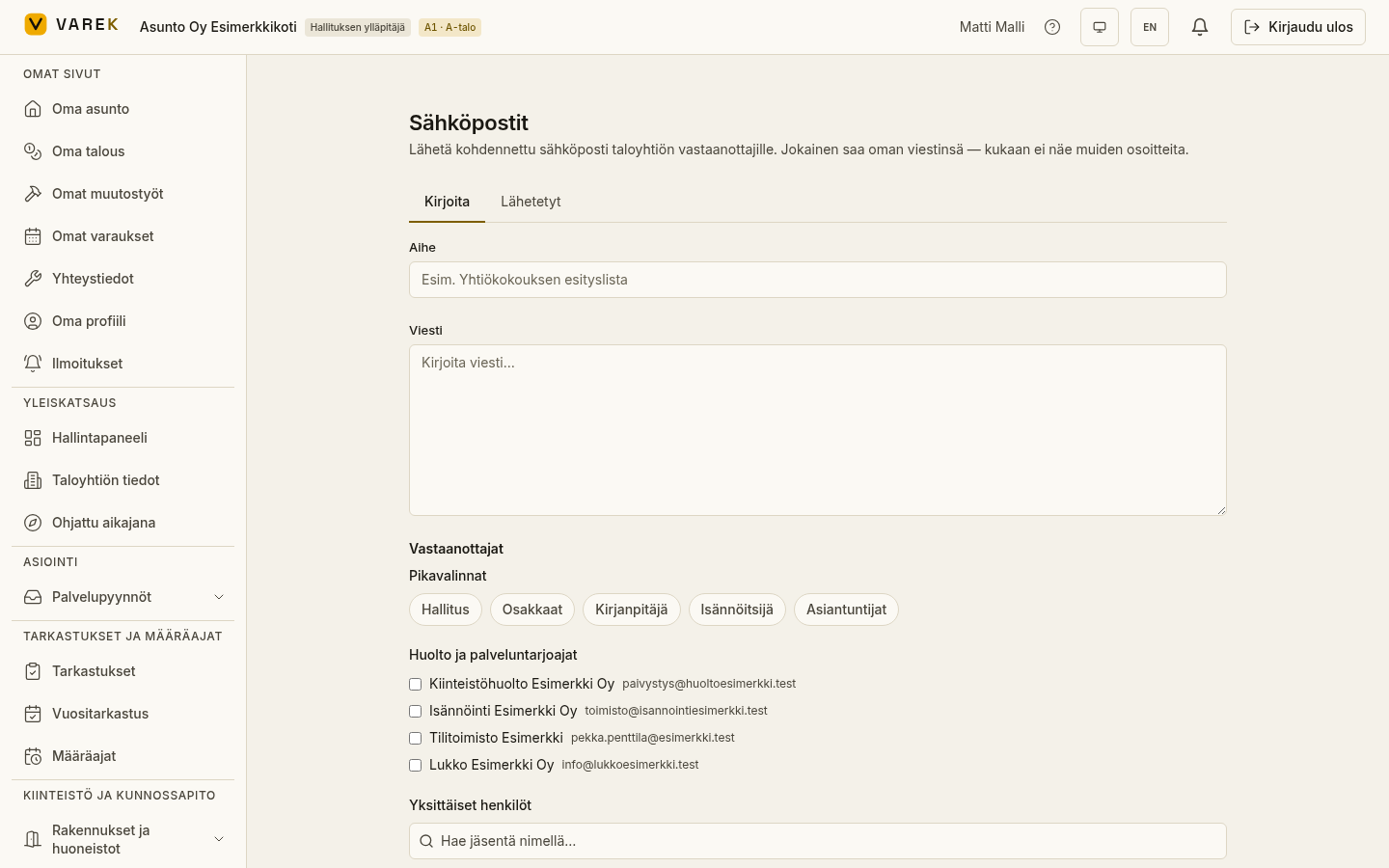
Who can send
Section titled “Who can send”Emails can be sent by the board administrator, board member, property manager and accountant. The page is in the left menu under Viestintä ja dokumentit (Communication and documents) → Sähköpostit (Emails).
Write and target a message
Section titled “Write and target a message”- Open Sähköpostit and stay on the Kirjoita (Compose) tab.
- Write the Aihe (Subject) and Viesti (Message).
- Choose the Vastaanottajat (Recipients):
- Pikavalinnat (Quick selects) target a whole role group: Hallitus (Board), Osakkaat (Shareholders), Vuokralaiset (Tenants), Kirjanpitäjä (Accountant), Isännöitsijä (Property manager) or Asiantuntijat (Consultants). You can pick several.
- From Huolto ja palveluntarjoajat (Maintenance and service providers) you can add, for example, the maintenance or cleaning company from the housing company’s service contacts.
- The Yksittäiset henkilöt (Individual people) search lets you add single members by name.
- Combine these freely (e.g. Board + Shareholders + property manager, or just the maintenance company). The recipient count updates as you choose.
- Add attachments if needed (see below).
- Check the Vastausosoite (Reply-to) and press Lähetä (Send).
VAREK sends one email per recipient, so addresses are never exposed to others. The same recipient is sent only once even if they fall into several groups.
Attachments
Section titled “Attachments”You can attach PDFs and other files two ways:
- Lataa tiedosto (Upload file) — upload a new file straight into the message.
- Valitse dokumenteista (Choose from documents) — attach the housing company’s existing documents.
All attachments are scanned for malware before sending; the message goes out only once the attachments are confirmed clean.
Reply routing
Section titled “Reply routing”Reply routing determines where recipients’ replies go. You choose it once for the whole housing company, from the compose view:
- Replies to a custom address — replies go to ordinary email. Defaults to your own address; you can enter another and press Tallenna oletukseksi (Save as default).
- Replies to the in-app inbox — replies come back into VAREK, where they appear under the original email and in a separate Inbox tab (see below). No separate reply-to address is needed.
Sent history
Section titled “Sent history”The Lähetetyt (Sent) tab lists the emails you’ve sent: subject, time, recipient count and status. Opening a message shows the per-recipient delivery status — and below it, any replies to that email. Emails sent by the board are visible to the board, and emails sent by the accountant only to accountants; replies inherit the same visibility.
Inbox — replies inside the app
Section titled “Inbox — replies inside the app”When reply routing is set to the in-app inbox, recipients’ replies come back into VAREK:
- The Saapuneet (Inbox) tab lists emails that have received replies (subject, reply count and latest sender). Opening a row shows the full reply thread.
- You also get a notification of each new reply. Notifications and reply visibility follow the same role scoping as sent emails.
Routing replies to the in-app inbox requires the housing company’s inbound email reception to be enabled. If it isn’t, replies go to the ordinary reply-to address.