Frequently asked questions
This page collects answers to the most common questions that touch several parts of the service. Each topic has its own detailed guide, linked at the end of the answer.
Products and plans
Section titled “Products and plans”What’s the difference between VAREK Reklamaatio and the whole-company plans?
Section titled “What’s the difference between VAREK Reklamaatio and the whole-company plans?”VAREK Reklamaatio is a focused product for claims and warranty management only: defect reports, claims and the 3-year deadline watch, warranty-repair tracking, the annual inspection, documents and PDF annotation, and AI claim drafts with KRIL precedents. Basic and Pro are whole-company plans that also cover finances and resident billing, communication, bookings, the maintenance log, the AGM and other administration tools. You can start with Reklamaatio and upgrade to a full plan at any time — your data is kept. See Products and plans and the pricing page.
User roles and access
Section titled “User roles and access”What roles does VAREK have?
Section titled “What roles does VAREK have?”The VAREK interface adapts to your role:
- Board — the chair (board_admin) and members (board_member). The board manages the whole housing company: defects, claims, finances, members and settings.
- Shareholder — sees their own apartment’s details, their own invoices and the company’s shared information, and can file defect reports and make bookings.
- Accountant — has access to the housing company’s finance module and reports (mostly read access).
- Consultant — gets limited, individually granted permissions.
- Tenant — a renter living in an apartment who is not a shareholder. Sees the housing company’s shared information and their own apartment’s details, and can file defect reports and make bookings. A tenant is invited by the apartment owner (the shareholder), not the board.
How do I get access to a housing company?
Section titled “How do I get access to a housing company?”Access is based on an invitation. The board invites members to the housing company, and you receive an invitation link by email that lets you join. Your role (shareholder, board member, accountant or consultant) is set by the invitation.
Can I see more than one housing company on the same account?
Section titled “Can I see more than one housing company on the same account?”Yes. If you belong to several housing companies, you can switch between them using the company switcher at the top. The “Omat taloyhtiöt” (My housing companies) page lists every company you have access to.
Claim deadlines
Section titled “Claim deadlines”Why is the claim deadline so important?
Section titled “Why is the claim deadline so important?”Claims expire in three years unless renewed. This is the single most important deadline VAREK tracks: if a deadline lapses, the right to demand a repair may be lost. VAREK tracks deadlines for you and reminds you of them in the “Määräajat” (Deadlines) view.
How do I renew a claim before it expires?
Section titled “How do I renew a claim before it expires?”The board can renew a claim from its own page:
- Open the claim from the “Reklamaatiot” (Claims) view.
- Choose the renewal action (“Uusi reklamaatio”, New claim).
- Confirm — VAREK creates a new draft linked to the previous claim and sets the next renewal deadline three years ahead.
- Review the new draft and send it to the builder.
:::note Board only. Creating, sending and renewing claims is the board’s job. :::
What’s the difference between a defect and a claim?
Section titled “What’s the difference between a defect and a claim?”A defect report records an observed fault — a shareholder can file one too. A claim (reklamaatio) is the formal demand sent to the builder, drafted by the board and carrying a statutory deadline. A claim is usually based on one or more defect reports.
Charges and billing
Section titled “Charges and billing”How are charge invoices created?
Section titled “How are charge invoices created?”In the finance module, the board (or accountant) runs a charge run (vastikeajo): first a preview, then a confirmation, which makes VAREK create a resident invoice for each apartment, complete with a reference number. Payment is a native Finnish bank invoice (reference number and bank barcode) — VAREK does not use card payments for charges.
What is the reference number, and why does it stay the same?
Section titled “What is the reference number, and why does it stay the same?”The reference number (viitenumero) identifies your payment so the company recognises it automatically. Recurring charge invoices use the same permanent reference number per apartment, so you can save it as a recurring payment in your bank. Always use the reference number printed on the invoice.
Who is the charge invoice sent to?
Section titled “Who is the charge invoice sent to?”The invoice is addressed according to the apartment’s billing settings. A single apartment can be billed with one invoice, a joint invoice to several owners, or split by percentage — depending on how the board has set up that apartment’s billing.
Paying an invoice
Section titled “Paying an invoice”How do I pay my own invoice?
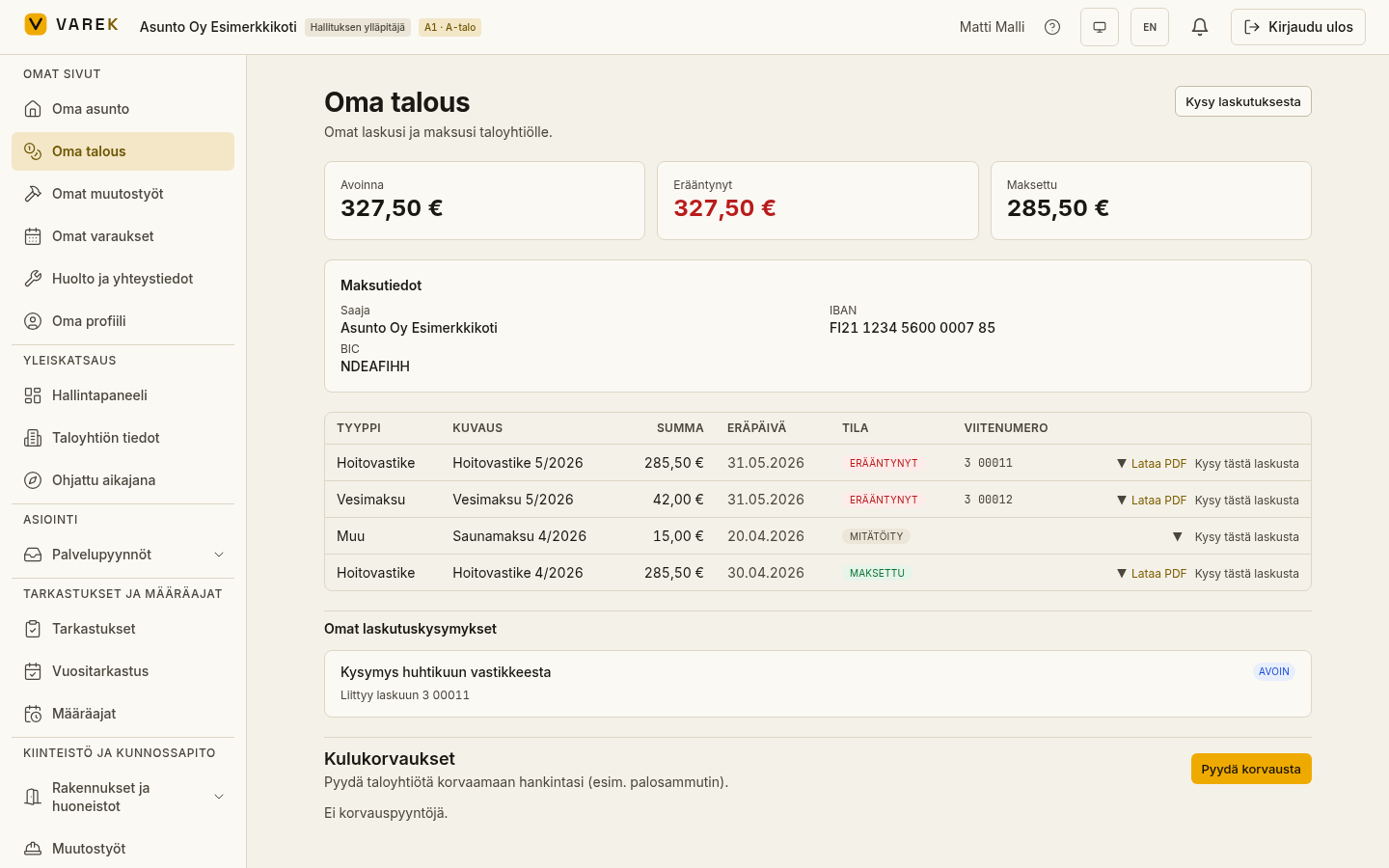
Section titled “How do I pay my own invoice?”VAREK shows your invoices on the “Oma talous” (My finances) page, but the payment itself is made in your own bank:
- Open “Oma talous”.
- Unpaid invoices show a payment-details box: payee, IBAN and BIC. The reference number appears in each invoice row’s own reference column (for unpaid invoices) and on the invoice PDF.
- Pay the invoice in your own online bank using these details, or download the invoice PDF (which includes a bank barcode) and pay it with your mobile bank’s barcode scanner.
- Once the company records the payment, the invoice status changes to paid.
How do I see whether my invoice is paid?
Section titled “How do I see whether my invoice is paid?”On the “Oma talous” page every invoice has a status (open, overdue, partly paid, paid or credit) plus the figures at the top for the open and overdue totals. You can also expand an invoice row to see its payment history.
I received a credit note — what does it mean?
Section titled “I received a credit note — what does it mean?”A credit note (e.g. a negative water settlement) means the company is refunding money to you. To receive the refund, you can enter your bank account number (IBAN) in your “Oma profiili” (My profile) settings, after which it appears on the credit note PDF.
Visibility — who sees what
Section titled “Visibility — who sees what”Can other shareholders see my invoices?
Section titled “Can other shareholders see my invoices?”No. “Oma talous” shows only your own invoices. The full finance module and other people’s invoices are visible to the board and the accountant, not to other shareholders.
How is document visibility controlled?
Section titled “How is document visibility controlled?”Each document is given a visibility level when it’s uploaded:
- Admin only — only the company’s admins.
- Board only — board members.
- Members — all members of the company.
- Apartment-scoped — only the residents of that apartment.
Visibility decides who can see the document.
Getting help
Section titled “Getting help”Where can I get help with using the service?
Section titled “Where can I get help with using the service?”- Billing questions: open “Oma talous” and choose “Kysy laskutuksesta” (Ask about billing) — or, for a single invoice, “Kysy tästä laskusta” (Ask about this invoice). The question is routed to the company’s accountant or board, and the reply appears in the same thread.
- Questions about the service, bookings or payments: contact tuki@varek.fi. We usually respond within two business days.
- Defect reports and maintenance requests are made directly in VAREK in their own views, not by email.