Filing a defect report
A defect report records a defect observed in the housing company. Any member can file one — including a shareholder. The more precisely you record the location, description and photos, the easier it is later to assemble a claim for the builder from the defect.
How to file a defect report
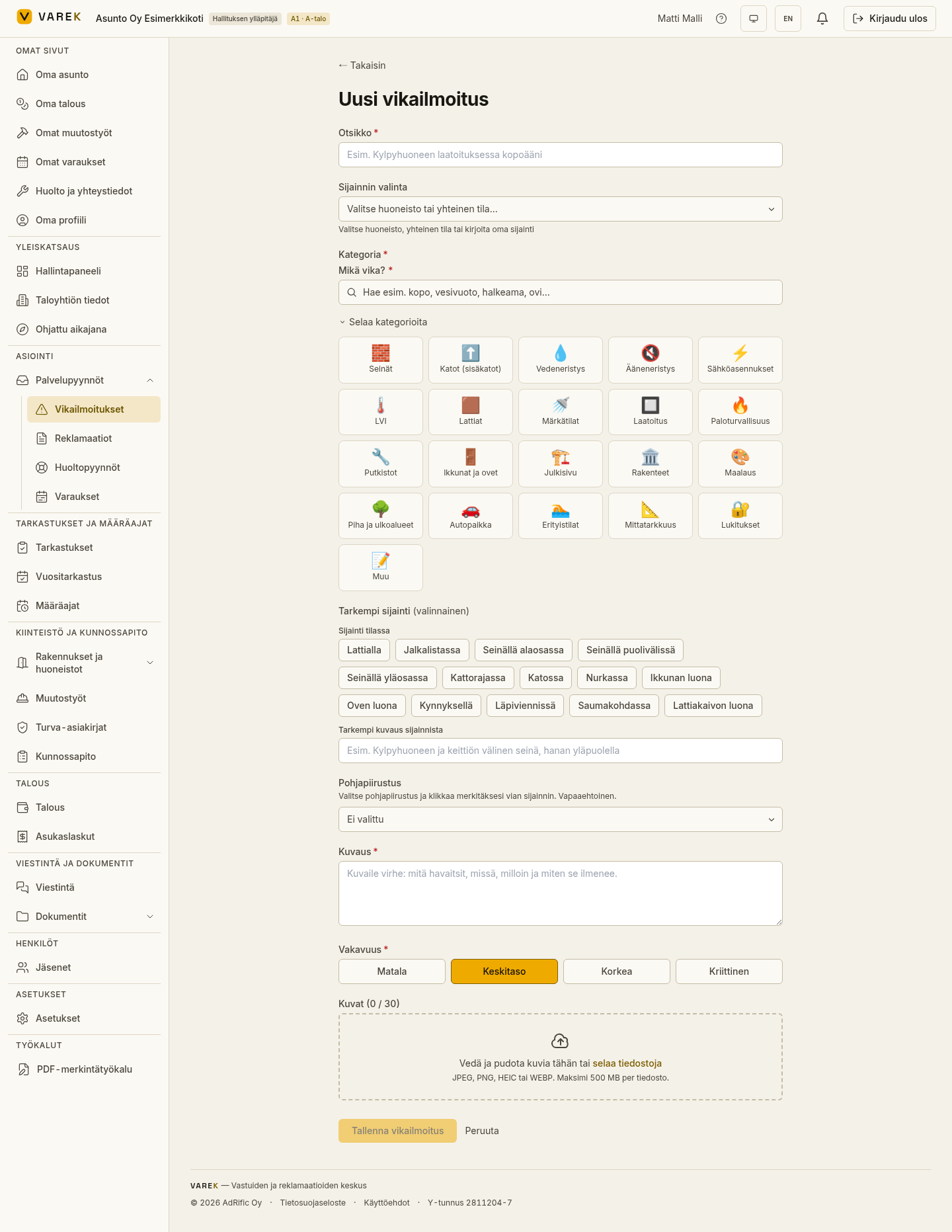
Section titled “How to file a defect report”- Open Vikailmoitukset (Defects) from the left-hand menu and choose Uusi vikailmoitus (New defect report) — or, from an empty list, the button that starts your first report.
- Write a title — a short, descriptive name for the defect (at least 3 characters).
- Choose the location: an apartment, a common area, or your own free-text location. For a shareholder, their own apartment is pre-selected automatically.
- Choose the category and, if needed, a subcategory.
- Refine the location if you wish: the room (e.g. bathroom), the position in the room (quick picks such as “Lattialla” / on the floor or “Ikkunan luona” / near the window) and free-text notes.
- Write a description — what you observed and how.
- Choose the severity: low, medium, high or critical.
- Add photos by dragging files onto the drop zone or selecting them. You can add several photos and annotate them before saving.
- Save with the submit button. You go straight to the defect’s page.
Pin the defect to a floor plan
Section titled “Pin the defect to a floor plan”If the housing company’s documents include floor plans, the form shows a Pohjapiirustus (Floor plan) selector. Choose a plan and mark the defect’s spot on it — plans linked to the selected apartment are shown first. With management rights you can draw an area (a polygon); others can place a point marker.
What happens after saving
Section titled “What happens after saving”- The defect gets the status Ilmoitettu (Reported) and appears in the Vikailmoitukset (Defects) list.
- In the background, VAREK suggests housing-company documents related to the defect.
- On the defect’s page you can add more photos, comment and — as a board member — change the status, edit the details and open a maintenance request from the defect.
Editing a defect
Section titled “Editing a defect”On the defect’s page the Muokkaa (Edit) button is available to the person who filed the report and to the board. In the edit panel you can update the title, description and severity, add photos and change the floor plan. Changing the status requires management rights.